
July 18, 2026
Cut-to-Size DTF: Pay for Print, Press Faster, Align with a Laser Guide
Edited on this dummy store
Cut-to-size DTF transfers flip the old gang-sheet workflow on its head. You pay for printed area, not blank film. Designs arrive trimmed and ready to press — and with a laser heat-press guide, placement on the garment is fast and repeatable.
Pay for ink — not empty film
Traditional sheets force you to buy a fixed rectangle even when half of it is unused white space. Cut service changes the math:
- Square-inch pricing on what actually prints — logos, names, and graphics.
- No wasted blank border you never press.
- Mix sizes on one order — hat logos next to left-chest prints — without paying for the gaps between them the same way a fixed sheet does.
That means more margin on small runs and less film sitting unused on your shelf.

Ready to apply — no extra trimming labour
When transfers ship cut to size, your press station stays a press station — not a cutting table.
- No scissors or rotary trimming between print and press.
- No weeding film borders around every logo.
- Faster handoff from box to platen — especially when you are running mixed sizes in one session.
Your team spends minutes pressing, not minutes prepping. For shops juggling same-day jobs, that labour save is as valuable as the film save.

Laser heat-press guides make placement easy
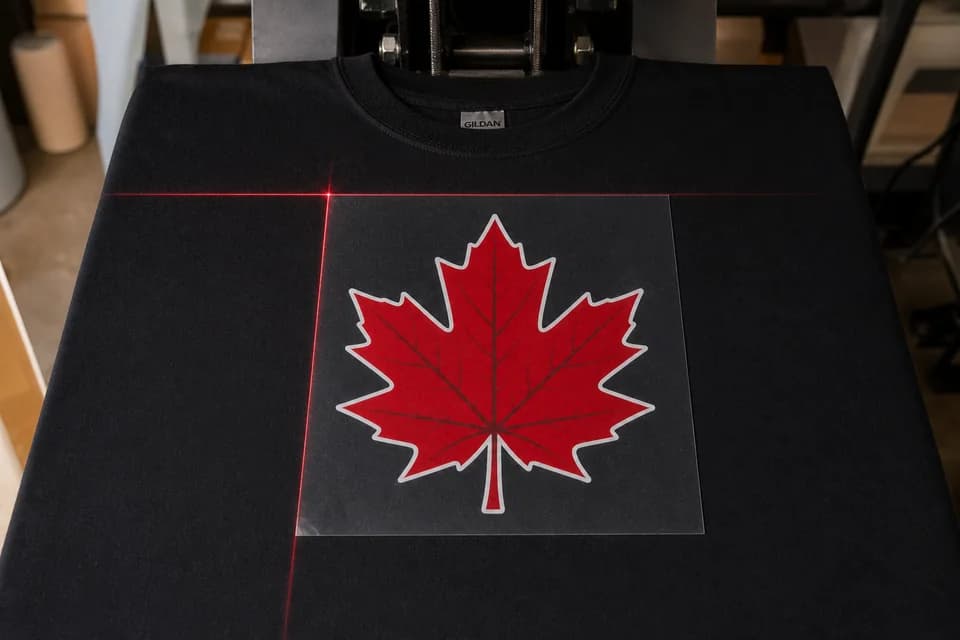
A cut transfer is only as good as where it lands. Pair cut-to-size DTF with a laser alignment guide on your heat press:
- Load the garment and pre-press to flatten fibres and drive out moisture.
- Turn on the laser crosshair or guide line — centre chest, left chest, or sleeve marks stay consistent order after order.
- Lay the cut transfer on the laser mark, cover with parchment or Teflon, and press.
Because the transfer is a clean rectangle, you can put the laser right on the film edge — square, centre, and press. No guessing against a sheet of blank film. New staff can hit the same placement as your best presser after a short walkthrough.

Who wins with cut-to-size?
- Print shops running mixed logos all week — less scrap, faster presses.
- Event / team orders with many names or numbers — each piece ready to grab.
- Beginners who want pro placement without a ruler every time.
How to order cut designs at Discount DTF
- Open the Gang Sheet Builder (or Easy Upload if your layout is already done).
- Nest your art on the rolling canvas — pay for the area you use.
- Add cut service / cut lines when you want designs trimmed and ready to press.
- Checkout before the same-day cutoff and press with your laser guide for clean placement.
FAQ
Do I still need to leave margin if I order cutting?
If you cut yourself, leave about 0.25″ between designs. With cut service, follow the builder’s cut-line settings — we trim to the art so you can press right away.
Does cutting change wash durability?
No. Cut-to-size only changes how the film is trimmed. Press settings and wash care stay the same as standard DTF.
Can I use a laser guide with any heat press?
Most modern clamshell and swing-away presses offer laser or alignment accessories. Even a simple laser crosshair mounted above the platen dramatically improves left-chest and centre consistency.
Rates and carriers: shipping. File setup before you nest: prep guide.